
Days to Hours
Convert days at 24 hours per day. Choose another mode for elapsed time or working hours.
- Free to use
- No sign-up
- Runs in your browser

Quick answer
15 days = 360 hours. Multiply days by 24. Workdays use your scheduled hours instead: 15 workdays × 8 = 120 hours.
Days to hours converter
Free printables
Single sheets you can print right now, no sign-up. The full pack adds every sheet in one download plus the editable files.
 Elapsed Time Conversion Worksheet
Time Conversion Printables
Printable time reference set: days-to-hours and hours-to-days charts, a decimal hours to minutes chart, a leave balance tracker workbook and an elapsed time worksheet with answers.
- Days to hours (PDF)
- Decimal hours (PDF)
- Leave tracker (XLSX)
- Elapsed time (PDF, DOCX)
Formats: PDF, XLSX, DOCX. Instant download after payment (link valid 72 hours, up to 5 downloads). AI-assisted: the templates were drafted with AI help and reviewed and laid out before publishing.
$3.00 USD, one-time 7 resource files + README (8 files total)
- Instant download
- 7-day refund
- Secure checkout by Stripe
7-day money-back guarantee. Full refund within 7 days of purchase, even after you download.
Free sample: Days to Hours Chart (PDF, 72 KB)
Full refund within 7 days — see the refund policy and license.
The formula
There are 24 hours in a day, so hours = days × 24 and days = hours ÷ 24. For minutes multiply by 1,440 (24 × 60) and for seconds by 86,400 (24 × 60 × 60). Decimal days work the same way: 2.75 days × 24 = 66 hours, because 0.75 of a day is 18 hours.
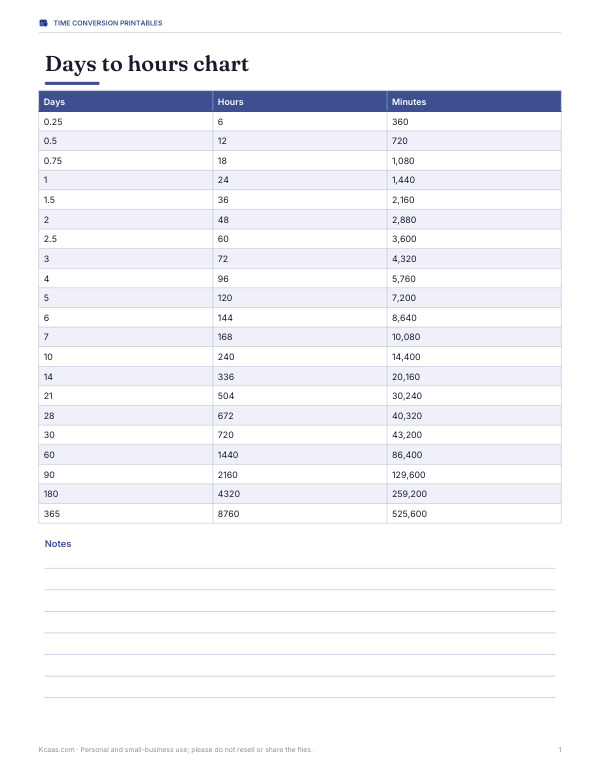
Days to hours chart
| Days | Hours | Days | Hours |
|---|---|---|---|
| 0.25 | 6 | 0.5 | 12 |
| 0.75 | 18 | 1 | 24 |
| 1.5 | 36 | 2 | 48 |
| 2.5 | 60 | 3 | 72 |
| 4 | 96 | 5 | 120 |
| 6 | 144 | 7 | 168 |
| 10 | 240 | 14 | 336 |
| 15 | 360 | 30 | 720 |
| 21 | 504 | 28 | 672 |
| 60 | 1440 | 90 | 2160 |
| 180 | 4320 | 365 | 8760 |
Converting fractions of a day
| Fraction of a day | Hours | Minutes |
|---|---|---|
| 0.1 | 2.4 h | 144 |
| 0.125 (⅛) | 3 h | 180 |
| 0.25 (¼) | 6 h | 360 |
| 1/3 | 8 h | 480 |
| 0.5 (½) | 12 h | 720 |
| 0.75 (¾) | 18 h | 1,080 |
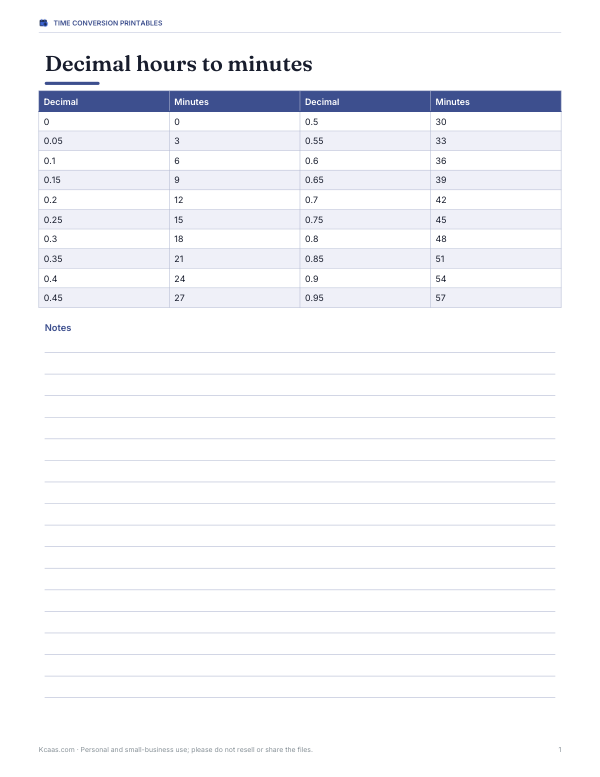
To split decimal hours into hours and minutes, multiply the decimal part by 60: 66.4 hours is 66 hours and 0.4 × 60 = 24 minutes.
How to use the converter
- Choose a mode: days to hours, hours to days, hours between two dates, or working hours.
- For conversions, type the number — decimals are fine.
- For elapsed time, pick the start and end date and time; the answer uses your device’s time zone and daylight-saving rules.
- For working hours, choose the first and last day, hours per day, which days you work and how many holidays fall in the range.
Everything is calculated in your browser.
Worked examples
- Decimal days: a job estimated at 3.6 days is 3.6 × 24 = 86.4 hours, or 86 hours 24 minutes — but as working time at 8 hours a day it is 28.8 working hours.
- Elapsed time: from Monday 09:00 to Thursday 17:00 is 3 days and 8 hours, or 80 hours.
- Working hours: three weeks of Monday-to-Friday work is 15 days; with one public holiday and 7.5-hour days that is 14 × 7.5 = 105 hours.
- Reverse: 100 hours is 4 days and 4 hours (4.1667 days).
Calendar days vs working days
A “day” means different things in different contexts. Calendar hours count every hour on the clock; working hours count only the hours you work. Project plans, invoices and service agreements often use working days, while medicine, travel and deadlines like “72 hours” usually mean clock hours. Check which is meant before converting.
Daylight saving time
In places that change the clocks, one day a year has 23 hours and another has 25. A period from 9 a.m. on the day before the spring change to 9 a.m. the day after is 24 clock hours on the calendar but only 23 hours of elapsed time. The “hours between two dates” mode measures real elapsed time and tells you when a clock change falls inside your range.
Why a day has 24 hours
Dividing the day into 24 hours goes back to ancient Egypt, where timekeepers split daylight into 12 parts and night into 12 more, using sundials and star clocks. The hours originally changed length with the seasons; equal hours of fixed length became standard only after mechanical clocks spread in medieval Europe. The minute and second come from the Babylonian base-60 number system, which is why an hour has 60 minutes and a minute 60 seconds.
Days, hours and leave policies
Employers often record holiday and sick leave in hours rather than days, especially for part-time staff or people who work different shift lengths. A “day” of leave then means the hours you would normally have worked that day — 7.5 or 8 hours for many full-time office jobs, but perhaps 12 for someone on long shifts. To convert a leave balance, multiply the days by your usual daily hours rather than by 24. For example, 15 days of leave at 7.5 hours a day is 112.5 hours.
Converting in a spreadsheet
In Excel or Google Sheets, dates and times are stored as days, so a cell containing a date-time difference is already in days: multiply it by 24 to get hours. For a cell showing 2.75, the formula =A1*24 returns 66. To display a duration longer than 24 hours as hours and minutes, use the custom format [h]:mm — the square brackets stop the hours from resetting at 24.
Hours in weeks, months and years
| Period | Hours |
|---|---|
| 1 week | 168 |
| 2 weeks | 336 |
| 30-day month | 720 |
| 31-day month | 744 |
| Average month (365.25 ÷ 12 days) | about 730.5 |
| Common year (365 days) | 8,760 |
| Leap year (366 days) | 8,784 |
A typical full-time work year of 52 weeks at 40 hours is 2,080 working hours — about 24% of the 8,760 hours in the year.
Everyday uses
- Converting leave balances between days and hours.
- Working out how long a delivery or refund window really is.
- Counting hours for medication schedules, such as every 36 hours.
- Timing experiments, slow cooking, fermentation or curing.
- Checking “48-hour” or “72-hour” deadlines against a calendar.
Frequently asked questions
How many hours are in 15 days?
15 days is 360 hours, because 15 × 24 = 360.
How many hours are in 10 days?
10 days is 240 hours, because each calendar day has 24 hours.
Is 15 workdays the same as 15 days in hours?
No. 15 calendar days is 360 hours, but 15 workdays depends on the work schedule; at 8 hours per workday it is 120 working hours.
How many hours are in a day?
24 hours.
How do I convert days to hours?
Multiply the number of days by 24.
How many hours are in 7 days?
168 hours.
How many hours is 2.5 days?
60 hours.
How do I convert hours to days?
Divide by 24; the remainder is the extra hours.
Does it handle daylight saving time?
Yes, the between-dates mode uses real elapsed time in your time zone.
How many hours are in a year?
8,760 in a common year and 8,784 in a leap year.